Database
Database backend runs on a PostgreSQL server
Database Design
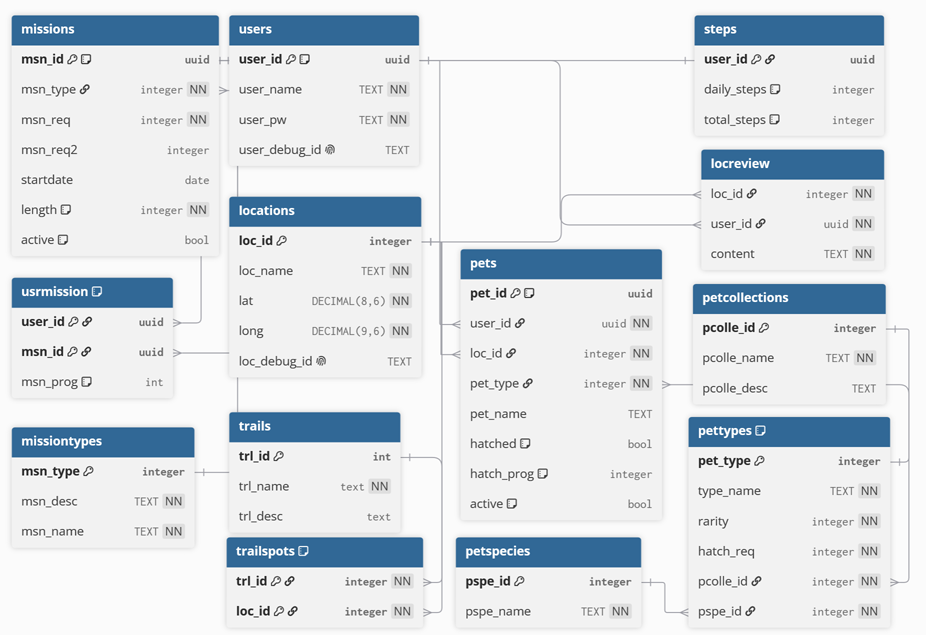
users
Stores user information.
| entry | description |
|---|---|
| user_id | unique user ID for identification, auto generated UUID |
| user_name | username for user, used for logins |
| user_pw | user password, used for logins |
| user_debug_id | text-based identification for dev purposes |
steps
Stores the steptracking information on a per user basis.
| entry | description |
|---|---|
| user_id | foreign key used to link steps entry with a user |
| daily_steps | amount of steps a user has taken that day |
| total_steps | accumulated steps for a user over lifetime of user account |
locations
Stores the list of locations, to be treated as hotspots the player can interact with by the app.
| entry | description |
|---|---|
| loc_id | unique identifier for the location, auto incremented integer |
| loc_name | name of the location |
| lat | latitude coordinates |
| long | longitude coordinates |
| loc_debg_id | text-based identification for dev purposes |
locreview
User-posted reviews of locations. one location can have many reviews. user/location pair should be unique, but one user can write for many locations and one locaton can have many user reviews
| entry | description |
|---|---|
| loc_id | foreign key used to link to the location the review is for, composite pk with user_id |
| user_id | foreign key used to link to a user, the writer of the review, composite pk with loc_id |
| content | contents of the review |
trails
a list of heritage trails
| entry | description |
|---|---|
| trl_id | unique identifier for the trail, auto incrememented integer |
| trl_name | name for the trail |
| trl_desc | descrption of the trail |
trailspots
locations on a trail. one location can belong to many trails, and one trail can have many locations, but a location/trail pair should be unique
| entry | description |
|---|---|
| trl_id | reference for the trail the location belongs to |
| loc_id | reference for the location the trail has |
pets
table storing every pet instance. every pet belongs to a user, one user can have many pets of the same type.
| entry | description |
|---|---|
| pet_id | unique identifier for a pet instance, auto generated UUID |
| user_id | reference for the user pet belongs to |
| loc_id | reference to the location pet was found |
| pet_type | pet type, combination of species and collection (e.g SIT kopi pet, default kopi pet, SIT kaya pet) |
| pet_name | name for the pet, should default to COLLECTION + PET TYPE (e.g SIT kaya toast) |
| hatched | boolean. whether or no pet has hatched |
| hatch_prog | number of steps taken with pet, used to calculate hatching progress. number of steps required for pet to hatch is referenced from pet_type entry |
| active | boolean. whether or not user currently has pet equipped |
pettypes
table storing pet types. each type is a combination of a species and a collection (e.g SIT kopi pet, default kopi pet, SIT kaya pet) pcolle_id/pspe_id pair should be unique
| entry | description |
|---|---|
| pet_type | unique identifier for each pet type. auto incremented integer |
| type_name | name of the pet type |
| rarity | rarity of the pet type |
| hatch_req | required number of steps for the pet to hatch |
| pcolle_id | reference to collection pet belongs to |
| pspe_id | reference to species pet belongs to |
petspecies
table of pet species. determines the pet's base model
| entry | description |
|---|---|
| pspe_id | unique identifier for each species, aauto incremented integer |
| pspe_name | name of the species |
petcollections
table of pet collections. determine's the pet's accessoties
| entry | description |
|---|---|
| pcolle_id | unique identifier for each collection, auto incremented integer |
| pcolle_name | name for the collection |
| pcolle_description | description for the collection |
note : in future schema updates, pettypes might be removed, each pet instance in pets table will store pcolle_id and pspe_id. hatch req and rarity will probably be moved to petspecies, or both will have hatch_req/rarity?
missions
table to store missions that the player can take part in
| entry | description |
|---|---|
| msn_id | unique identifier for the mission, auto generated uuid |
| msn_type | reference to mission types table, determines part of the complete condition |
| msn_req | numerical requirement to complete mission (e.g 300 for 300 steps, 2 for 2 pets hatched) |
| msn_req2 | optional field for if the mission has 2 things to fufil |
| startdate | records the date the mission will become available |
| length | length of the mission, in days. 1 for daily, 7 for week, for example. 0 should be treated as infinite duration mission |
| active | whether or not mission is active |
missiontypes
determines the type of mission. is it a walking-based mission, or a hatching baed mission like that stuff
| entry | description |
|---|---|
| msn_type | unique identifier for each mission type, auto incremented integer |
| msn_desc | mission description, planned to use to with formatting. e.g WALK ## STEPS combined with msn_req will become WALK 300 STEPS |
| msn_name | name for mission type |
usrmission
table containing user progress for missions. any given user_id/msn_id pair should be unique. one mission can have many users, and one user can do many missions
| entry | description |
|---|---|
| user_id | reference to the user the mission progress is for |
| msn_id | reference to the mission |
| msn_prog | users prigress on the mission |
Building Database
In PostgreSQL folder there should be a makefile and schema.sql
in WSL, run make to setup user and create database tables.
run make drop-all to delete user and database tables.
currently, when schema is updated, table needs to be destroyed and rebuilt. this can be done by doing make drop-all and then make.
Connecting to database on pgadmin4
When registering a server (right click Servers > register)
Under connections tab:
Host name/address:    localhost
Port:                 (default pgsql port)
Maintenance database: (dbname)
Username:             (username)
Password:             (fill in the password)
Under SSH Tunnel tab:
Use SSH Tunneling: (turn it on)
Tunnel host:       (VM ip address)
Tunnel Port:       22
Username:          (our username)